
Collaborate on Research with Ponder’s Sharing and Syncing Features: AI-Powered Tools for Academic Collaboration
 ·7/28/2026·14 min read
Research teams often struggle with fragmented tools, scattered notes, and slow feedback loops that interrupt momentum and dilute insight. This article explains how a unified, AI-augmented collaborative workspace can restore context, speed synthesis, and enable real-time co-authorship across devices and formats. Readers will learn the mechanics of shared canvases and knowledge maps, practical sharing and permission models, the role of an AI Agent in group synthesis, cross-device syncing behaviors, and security considerations for sensitive research. The guide maps each stage of a research workflow—from importing PDFs and web pages to exporting structured reports—and shows how visual organization and AI-assisted summarization reduce tool switching and accelerate consensus. Throughout, we use the language of academic collaboration and highlight concrete platform capabilities as examples to illustrate real-world team outcomes. By the end you will have a stepwise mental model for adopting an AI-powered collaborative research workspace and practical checks to keep data secure and reproducible.
Quick answer: Effective academic collaboration requires tools that align on shared documents, track contributions, and support async review. Google Docs and Overleaf lead for co-authoring. Notion and Confluence for shared knowledge bases. Zotero groups for shared reference libraries. For research teams who need to collaboratively synthesize literature into a shared knowledge map — where each member can see connections across the team's sources — Ponder's canvas supports multi-user research synthesis.
How Does Ponder Enable Real-Time Research Collaboration?
Real-time research collaboration means multiple contributors working within the same shared knowledge space while preserving provenance and context. Ponder supports this through an infinite canvas and living mind maps that keep ideas, sources, and annotations together, allowing teams to converge on ideas without losing the original sources. The mechanism combines visual linking of ideas with live editing so that hypotheses, evidence, and comments remain attached to the nodes they reference, which reduces miscommunication and speeds decision cycles. For teams that compile mixed media—PDFs, videos, web pages, and text—Ponder’s unified workspace keeps artifacts and insights adjacent, preserving traceability and making synchronous or asynchronous brainstorming more organized. These capabilities directly address common collaboration pain points and set up the next topic on the specific benefits of a shared research workspace.
What Are the Benefits of Ponder’s Shared Research Workspace?
A shared research workspace centralizes artifacts and discussion so teams spend less time hunting for context and more time synthesizing evidence. Teams gain faster consensus because comments and edits are visible in context, which shortens review loops and reduces repetitive meetings. Knowledge continuity improves since conversation history and linked sources remain within the canvas, enabling newcomers to onboard quickly and reviewers to trace argument evolution. Reduced tool-switching enhances deep work by keeping literature, notes, and visual outlines in one place, allowing researchers to maintain cognitive flow and produce clearer outputs. These operational benefits naturally lead to how the infinite canvas supports collaborative knowledge mapping at a structural level.
Key collaborative benefits of a shared workspace include: Faster consensus: in-context edits and comments accelerate decision-making and reduce review cycles. Preserved continuity: linked sources and history enable reproducible reasoning across project phases. Reduced tool-switching: unified artifacts keep focus on synthesis rather than file management.
This concise list highlights operational improvements that translate into measurable time savings and clearer manuscripts for academic teams.
Understanding the operational benefits often leads to questions about investment. For a comprehensive overview of available plans and features, including details on different subscription tiers, please visit the Ponder pricing page.
How Does Ponder’s Infinite Canvas Support Collaborative Knowledge Mapping?
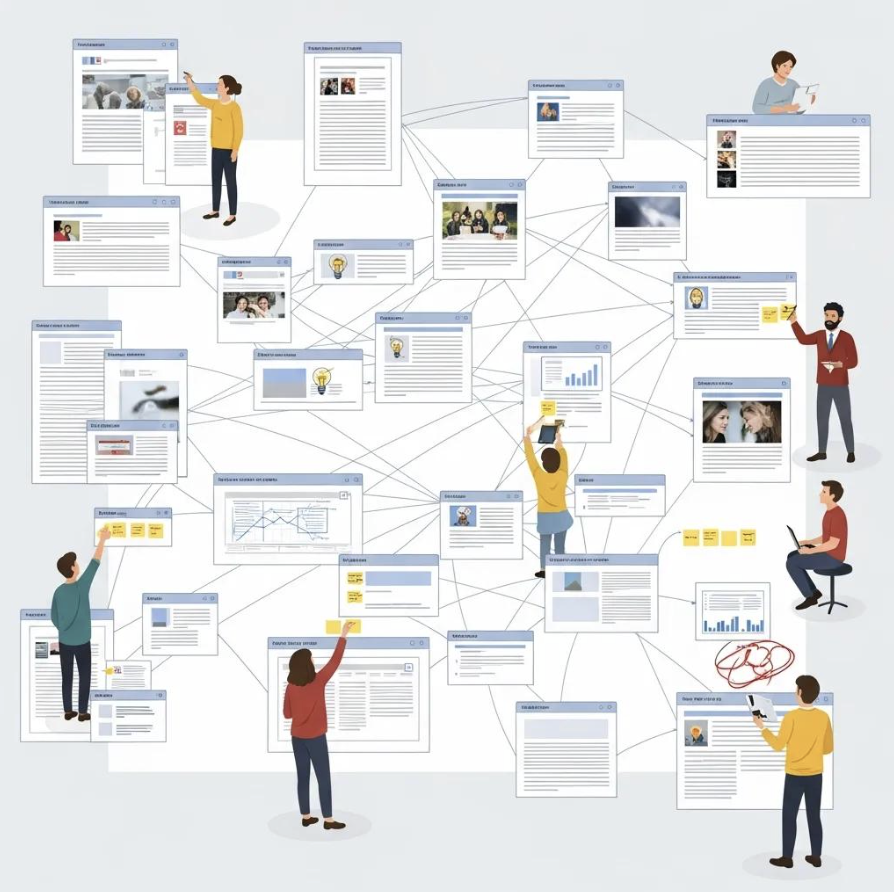
The infinite canvas functions as a non-linear, zoomable space where nodes represent ideas, evidence, or tasks and links represent relationships and provenance. Researchers can import PDF to mind map, web page to concept map AI, connect source nodes to argument nodes, and visually trace citation-to-claim pathways, which supports interdisciplinary synthesis and transparent reasoning. Because the canvas is collaborative, multiple contributors can seed branches, tag gaps, and coalesce a literature map that later becomes the scaffold for a manuscript or grant narrative. Visual mapping also improves traceability: each insight carries metadata about its origin, making it easier to export structured outlines or reports with source links intact. Understanding the canvas mechanics clarifies the sharing and versioning features teams need to keep collaborative maps stable and auditable.
What Sharing Features Does Ponder Offer for Secure Research Collaboration?
Sharing features for collaborative research encompass permission models, link-based access, and export options that preserve evidence chains while controlling distribution. Effective sharing capabilities for research tools typically include role-based permissions (such as view, comment, or edit), workspace-level invitations, and configurable link sharing so project leads can tailor collaboration to publication or confidential review needs. Ponder’s collaborative mind maps are designed to fit into these kinds of workflows. The platform supports multi-format import and export, enabling teams to bring PDFs, videos, and web pages into the workspace and to export structured reports and mind maps (PNG, HTML) for manuscript drafting. These features align with secure workflows by enabling teams to restrict access while still allowing selective external review or archival exports, and they provide the operational building blocks for version control and data integrity discussed next.
The primary sharing features include:
Permission granularity: clear controls over who can view or modify shared projects and documents.
Link-based invites: shareable links that can be restricted to appropriate collaborators or reviewers.
Export and reuse: export options that produce structured reports and mind maps in multiple formats (PNG, HTML, Markdown) for downstream use.
These feature categories show how researchers can balance openness for peer review with controlled access for sensitive data, and they segue to a concrete comparison of sharing attributes.
Different sharing scopes and attributes determine how teams exchange and preserve research artifacts.
Sharing Scope | Attribute | Capability |
|---|---|---|
Document-level | Access levels | Controls over who can open or modify individual files and nodes |
Workspace-level | Membership control | Invitations and project-level access settings |
External review | Link behavior | Share links that can be limited to appropriate reviewers |
This table clarifies how granular controls map to collaborative scenarios and why choosing the right scope matters for reproducibility and compliance.
Teams should map sharing scope to project sensitivity and publication stage to prevent accidental disclosures while preserving reviewability for collaborators and peer reviewers.
How Can Teams Share and Sync Documents Seamlessly in Ponder?
Seamless sharing and syncing rely on simple invite flows, in-place annotation, and automatic propagation of edits so collaborators see updates immediately. Teams typically invite members by workspace invitations or share permissioned links, then annotate sources directly on the canvas so comments remain attached to the evidence they reference. Auto-syncing propagates edits across devices and sessions, while in-place comment threading keeps discussion contextual and reduces version fragmentation. For administrators, a short checklist—set project-level permissions, require contributor attribution, and schedule exports for archival—helps maintain governance while enabling fluid collaboration. These operational steps lead directly into how version control and history protections preserve integrity across simultaneous edits.
How Does Ponder Ensure Version Control and Data Integrity?
Version control in collaborative research must provide history, restore points, and edit attribution so teams can audit changes and revert unintended edits. In collaborative research, teams need access to history, restore points, and edit attribution so they can audit changes and revert unintended edits. Many research teams pair Ponder with institutional versioning or backup practices to compare snapshots, attribute edits to contributors, and recover prior states when conflicts arise. Clear governance around who edits which parts of a project helps preserve reproducibility for collaborative manuscripts and multi-center studies. Understanding these versioning guarantees helps teams plan backup cadences and export schedules for long-term archival and compliance.
Versioning and integrity translate into concrete practices researchers should adopt:
Regularly export project snapshots for archival and compliance evidence.
Use separate canvases or duplicated projects for major revisions before integrating changes.
Track contributor responsibilities to simplify audit and conflict resolution.
This set of practices reduces the risk of data loss and preserves interpretability across research handoffs.
How Does Ponder’s AI Agent Enhance Collaborative Research Insights?
AI research tool collaborative workspace accelerates synthesis by scanning shared content, extracting themes, and proposing structured outlines that teams can refine. The Agent can summarize multiple documents, surface recurring themes across literature, and seed knowledge maps with suggested nodes and links, enabling teams to move from scattered notes to a coherent argument faster. By working over the combined project content, the AI Agent identifies gaps and suggests follow-up searches or experiments that the team can prioritize, thereby turning passive archives into actionable worklists. These AI-driven capabilities augment rather than replace human judgment, and the next subsection details concrete prompts and outputs teams can expect when using an AI Agent collaboratively.
The AI Agent supports collaborative insights in specific ways:
Summarization: condenses multiple sources into digestible syntheses for team review.
Theme extraction: identifies recurring topics and potential gaps across the workspace.
Structuring: generates outlines and suggested knowledge-map nodes to speed drafting.
These capabilities help teams iterate more quickly and prepare high-quality materials for peer review and publication.
In What Ways Does the AI Agent Support Team Idea Generation and Analysis?
The AI Agent helps teams by surfacing emergent themes and proposing testable hypotheses based on combined evidence in the workspace. Example prompts include asking the Agent to "summarize methods across imported PDFs and highlight methodological gaps" or to "generate a three-part outline connecting A and B literatures for an interdisciplinary manuscript," which yields concise outputs that teams can edit collaboratively. The Agent can produce topic lists, suggested experiments, and gap analyses that frame team discussion and prioritize next steps, turning exploratory meetings into action-oriented plans. By iterating prompts and refining outputs, teams use the Agent as a catalytic collaborator that accelerates idea convergence while preserving human oversight for interpretation and validation.
Example practical prompts for team use:
"Summarize the main findings across these five PDFs and list methodological differences."
"Identify three understudied themes that connect these two disciplines."
"Produce a draft outline for a review article based on imported notes and sources."
These prompt patterns illustrate how the Agent translates raw content into structured starting points for collaborative refinement.
How Does AI Automate Research Workflows for Collaborative Teams?
AI automations reduce manual triage by generating concise summaries from imported materials and helping produce export‑ready outlines that teams can use as drafting scaffolds.An end-to-end example: import a batch of PDFs, run automated extraction to capture key points and citations, use the Agent to synthesize a literature map, and export an outline or structured report (for example as PNG, HTML, or Markdown) for manuscript drafting—this pipeline streamlines steps that historically required repetitive manual labor. Automation also standardizes initial syntheses so collaborators spend less time reconciling different note-taking styles and more time refining arguments. While automation speeds workflows, human validation remains essential to ensure interpretation fidelity and to contextualize AI suggestions for disciplinary norms.
These automated workflow elements typically include:
Source-grounded summaries that keep important references attached to their originating materials.
Summary generation to produce consistent, comparable document synopses.
Template-based report generation to accelerate manuscript drafting.
Automation turns heterogeneous inputs into a consistent starting point for team-driven analysis and writing.
How Does Ponder Manage Cross-Device Syncing for Research Teams?
Cross-device syncing ensures that researchers can access the same project state from laptops, tablets, or phones while preserving consistency and minimizing sync conflicts. The platform implements automatic syncing across sessions with session persistence so edits are propagated near-instantly and contributors see presence indicators for concurrent collaborators. When teams work across devices and locations, it is important to minimize sync conflicts and ensure changes remain attributable to specific contributors. Researchers can pair Ponder with institutional storage and export practices to keep a consistent project state across laptops, tablets, and phones. These mechanisms provide teams with a unified source of truth for project artifacts, which reduces duplication and keeps geographically distributed teams aligned. The next subsection explains practical advantages of syncing research notes across devices and scenarios where this matters most.
What Are the Advantages of Syncing Research Notes Across Devices?
Syncing research notes across devices delivers continuity between fieldwork, lab meetings, and writing sessions, ensuring ideas captured in the moment are available for team synthesis later. Teams benefit from fewer lost observations, faster cross-timezone collaboration because edits are visible asynchronously, and a centralized knowledge state that reduces redundant note-taking. Syncing also supports varied workflows: a researcher can clip a web page on a phone, then expand the idea on a laptop during a writing session, preserving provenance and source metadata. Best practices include enabling offline mode when traveling, tagging items for follow-up, and scheduling periodic exports to institutional archives to maintain reproducible records. These practical advantages lead into a concrete representation of device sync behaviors.
Ponder supports cross-device access, allowing researchers to work from desktop, tablet, or mobile devices. The platform syncs project state across sessions to maintain consistency for distributed teams.
How Does Ponder Maintain Data Consistency and Accessibility?
Data consistency is maintained through clear conflict-resolution policies, version history, and web-based access that minimizes platform friction for collaborators. When concurrent edits occur, the system records edit attribution and provides merge options so teams can reconcile differences explicitly rather than silently overwriting content. Web-based accessibility reduces onboarding friction for new contributors and supports cross-platform collaboration without mandatory software installs, while export options enable institutional backups and compliance-driven archival. Practical tips include scheduling mid-project exports, using named versions for major milestones, and defining contributor roles to reduce simultaneous edits on critical nodes. These governance practices complement the technical sync behavior and set up the next section on security and privacy.
How Does Ponder Ensure Secure Data Sharing for Collaborative Research?

Secure data sharing for research rests on clear privacy commitments, controlled access, and trustworthy processing of uploaded content by AI systems. Ponder’s privacy and data-handling details are documented in its official agreements, which outline how personal data and uploaded content are processed. Researchers should review these documents directly and confirm how AI processing, data retention, and training policies apply to their use cases. Access controls, permission granularity, and audit trails add layers of operational security so teams can confine sensitive material to trusted project members while enabling selective exports for review. These elements together form a trust framework researchers can pair with institutional governance and recommended export practices to manage sensitive data responsibly. The following subsections unpack privacy measures and compliance-related practices more concretely.
What Privacy Measures Protect Sensitive Research Data in Ponder?
Privacy protections in any research tool should include clear statements about what personal data is collected, how uploaded content is processed by AI systems, and whether that content is retained or reused. Researchers using Ponder should consult its published privacy and service agreements to understand these details before uploading sensitive material. Practical protective features include role-based access, permissioned link sharing, and export capabilities that let teams retain local or institutional copies. Researchers should apply additional safeguards—such as anonymization, controlled export schedules, and institutional approvals—when handling human-subject or proprietary data to meet ethical and regulatory obligations. Combining platform-level privacy claims with team governance yields a defensible approach to managing confidential research while still leveraging collaborative features for synthesis and drafting.
Teams handling sensitive information should follow a simple checklist to reduce exposure risk:
Anonymize or redact personal data before uploading when possible.
Limit project membership and use time-limited links for external reviewers.
Export and archive periodic project snapshots within institutional repositories.
These steps align platform privacy guarantees with institutional compliance needs and support reproducible research practices.
How Does Ponder Comply with Data Security Standards for Research Teams?
A secure research setup depends on understanding how a platform processes and stores data and combining that with institutional governance. Teams using Ponder should review its security and data-handling documentation and then layer on internal controls such as defined access roles, approvals for sensitive uploads, and regular exports for institutional backups. For institutional compliance, teams should document the platform’s handling statements and pair them with internal governance: define access roles, require institutional approvals for sensitive uploads, and maintain export-based backups for auditability. Administrative controls—project-level permissions, audit logs, and version history—support governance by providing traceable evidence of access and edits. Combining platform assurances with these operational controls creates a layered security approach appropriate for academic collaborations and regulated research projects.
To operationalize compliance, teams can adopt these governance actions:
Maintain a permissions ledger for each sensitive project and log external reviewers.
Schedule regular exports for archival in institutionally approved repositories.
Require contributor acknowledgements documenting data handling expectations.
These governance tasks reinforce platform-level claims and help meet institutional and funder expectations for secure research practices.
What Are the Key Use Cases for Ponder’s Collaboration Features in Academic Research?
Ponder’s combination of a shared canvas, AI-assisted synthesis, and multi-format import/export supports several high-value academic workflows across the research lifecycle. Key use cases include collaborative literature reviews that consolidate many sources, co-authoring workflows that convert knowledge maps into export-ready outlines, interdisciplinary synthesis where visual linking reveals cross-domain connections, and student group projects that require low-friction onboarding and shared templates. These use cases emphasize outcomes such as faster literature triage, clearer argument scaffolds for manuscripts, and improved teaching workflows for collaborative assignments. Below we present specific examples of co-authoring and interdisciplinary/student project usage to show how these capabilities translate into reproducible research outcomes.
How Do Academic Research Teams Use Ponder for Co-Authoring and Literature Reviews?
Academic teams use a stepwise workflow: import via convert research paper to concept map to capture summaries and citations, map arguments on the canvas, assign draft sections to contributors, and export a structured outline for manuscript drafting. This pipeline centralizes sources and keeps claims linked to evidence, which reduces misattribution and speeds peer revision cycles. Measurable outcomes include shorter time-to-draft, clearer contribution tracking, and fewer missed citations at submission. Teams often adopt templates for review articles so the AI Agent can seed consistent outlines and contributors can focus on narrative and interpretation rather than repetitive extraction tasks.
A concise co-authoring checklist helps teams operationalize the workflow:
Import and tag sources by theme or method.
Use AI summarization to create comparable synopses for review.
Map claims to sources, assign drafting tasks, and export outlines for manuscript drafting.
These steps make collaborative writing more efficient and auditable for peer review.
How Does Ponder Support Interdisciplinary and Student Group Projects?
Interdisciplinary teams and student groups benefit from the visual, low-friction interface that the infinite canvas provides, which helps bridge differing conceptual models and disciplinary vocabularies. Templates and shared canvases accelerate onboarding for students, while role-based permissions let instructors control contribution scope and assessment visibility. Visual linking of concepts across disciplines reveals synthesis opportunities and reduces misunderstanding between team members with different training. Recommended instructor practices include providing starter templates, defining roles for contribution, and scheduling staged exports to evaluate progress and preserve instructor feedback. These pedagogical patterns help teams produce coherent deliverables and teach reproducible collaboration habits.
Practical tips for educators and project leads include:
Provide starter canvases with example nodes and citation placeholders.
Assign clear roles and deadlines to scaffold student collaboration.
Use periodic exports to capture progress and provide structured feedback.
These approaches help teams and classes adopt collaborative research workflows that emphasize transparency and skill development.
Frequently asked questions
What makes academic collaboration effective?
Effective academic collaboration requires clear communication, defined roles, shared access to resources, and tools that support co-authoring and knowledge sharing. Regular check-ins and transparent documentation of decisions prevent friction as projects grow.
What tools support academic collaboration?
Shared reference managers (Zotero groups, Mendeley teams), cloud writing platforms (Overleaf, Google Docs), and AI research assistants like Ponder — which lets teams ask questions across a shared document library — all support different stages of collaborative research.
How does Ponder support collaborative research?
Ponder Projects act as shared knowledge workspaces where teams can pool PDFs, web sources, and notes, then ask AI questions across the whole collection — ensuring every collaborator builds on the same foundation of evidence rather than siloed individual reads.