
Source finder: find the papers most relevant to your research question
A source finder is a tool that takes a topic or question and returns the sources most relevant to it. Ponder, an AI research workspace, searches 320M+ scholarly works for the papers that best match your question and shows what each one says about it.
A Ponder research case
Open the full caseTrusted by 400,000+ researchers in academia and industry











How it works
How to use Ponder’s AI source finder
- Step 1
Enter a topic or question
Write the topic or question as one full sentence and click Find sources. For medicine and the life sciences, set the scope to PubMed.
- Step 2
Ponder searches the literature
It searches 320M+ scholarly works and puts the papers that best match the question first.
- Step 3
Receive the most relevant papers
Each paper carries a key takeaway stating what it says about the question, so one line shows whether the paper is relevant. A review with numbered citations summarizes the set.
What it does
What Ponder’s source finder does
Finds the papers most relevant to your research
Ponder judges relevance from the whole question, including the relationship it asks about, rather than from matching keywords. The papers that answer the question are listed first, each with a key takeaway written for it.
- Research paper
- Essay
- Thesis
- Scholarly sources
Narrows the search to the studies you need
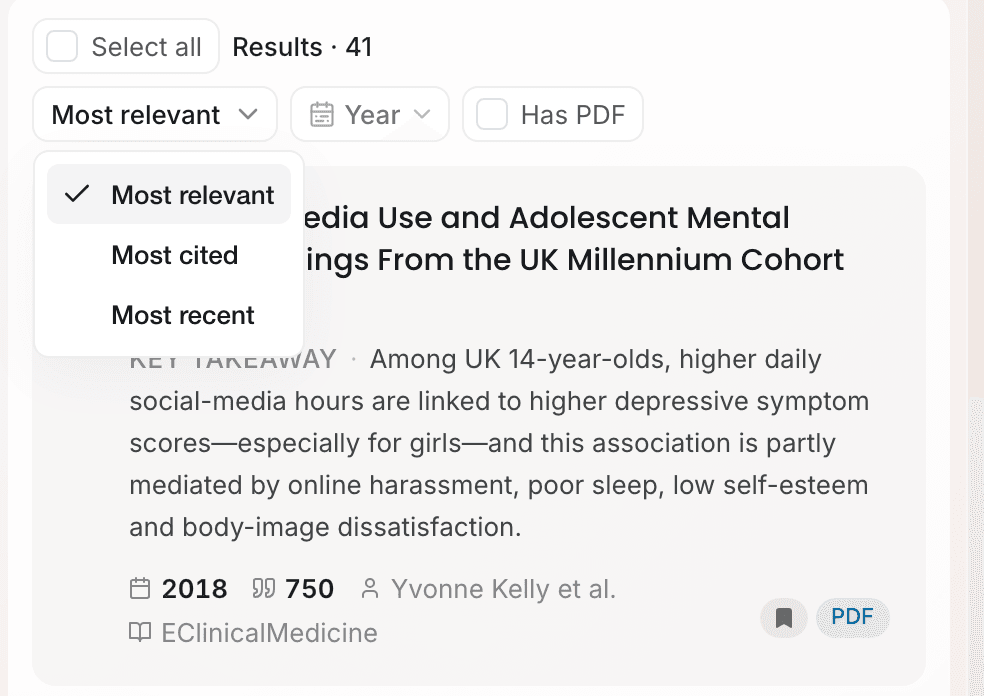
State the study design, population or outcome in the question and Ponder looks for studies that match. Above the results, sort by Most cited or Most recent, and filter by Year or Has PDF.
- Recent studies
- Randomized trials
- Highly cited papers
- Full-text PDFs
Expands the search from seed papers
Select the papers closest to the question and send them as seed papers. Ponder searches for studies similar to them. The Selected bar also saves the selected papers to the project in one step.
- Seed papers
- Related studies
- Similar papers
Answers questions from the papers it found
Ask in the box under the results, such as which trials report effects on retention. Ponder answers from the same papers with numbered citations, or searches again when they are not enough.
- Comparing studies
- Study designs
- Sample sizes
- Conflicting findings
Compare
Why use Ponder as your source finder
| Searching databases by hand | General AI chatbot | Ponder | |
|---|---|---|---|
| How you search | Keywords, operators and filters | A question in plain language | A question in plain language |
| What you get back | A list ordered by keyword match, date or citations | An answer that names a few sources | Papers ordered by relevance to the question |
| How you judge each paper | Open the abstracts one by one | From the summary in the answer | A key takeaway for your question on each paper |
| Narrowing down | Rewrite the query and add filters | Ask again | Add conditions, apply filters, or search from seed papers |
| Do the sources exist? | Yes | Not always; a reference may not match a real paper | Yes; each result is a paper record you can open |
| Sign-up | Library access | Often not needed | Needed; free plan available |
Why you can rely on it
Each result is a real paper you can open
- scholarly works searchable
- 320M+
- researchers use Ponder
- 400,000+
- countries where researchers use Ponder
- 120+
Each paper Ponder returns comes from a scholarly literature database and is identified by its DOI or database record, so the authors, journal and year on the card are taken from that record. Papers with a PDF badge open in full text inside Ponder.
How Ponder handles your dataQuestions
Learn more about source finders and Ponder
What is a source finder?
A source finder is a tool that takes a topic or question and returns the sources most relevant to it. An academic source finder limits the search to scholarly literature, so the results are research papers rather than web pages.
How does Ponder decide which sources are most relevant?
Ponder uses the whole question, including the relationship it asks about, to judge which papers actually answer it, and lists those first. Each paper carries a key takeaway stating what it says about the question. Results can also be sorted by Most cited or Most recent.
How do I get more relevant results from an AI source finder?
Write one complete question instead of a list of keywords, and put conditions such as study design, population or outcome into it. In Ponder, results that are too broad can be narrowed with a follow-up question, the Year and Has PDF filters, or by selecting the most relevant papers as seed papers and searching for similar studies.
Can Ponder find sources for a research paper or an essay?
Yes. Enter the topic or question of the paper or essay and Ponder returns the most relevant scholarly papers, each with a key takeaway for that question, plus a review with numbered citations. Select the papers worth keeping and save them to a project.
What if no source matches my question closely?
When nothing matches closely, Ponder indicates this and shows the closest papers it found; when nothing is found at all, it suggests other ways to phrase the search. Widening the question or using more standard academic wording usually helps.
Are the sources Ponder finds real?
Yes. Ponder retrieves papers from scholarly literature databases instead of writing references from memory, so each result is a record with its title, authors, journal and year. Preprints and retracted papers are marked with badges.
Can ChatGPT find sources for a paper?
A general chatbot can suggest sources, and with web search it can link to pages, but references written from memory do not always match real papers, so each one needs checking. Ponder searches the scholarly literature for the question and returns the papers themselves, ordered by relevance, each with its authors, journal and year.
Is Ponder’s source finder free?
Yes. Ponder has a free plan you can use as soon as you sign up. Paid plans give you more usage.