

Ponder — When Your Research Library Needs to Drive the Draft
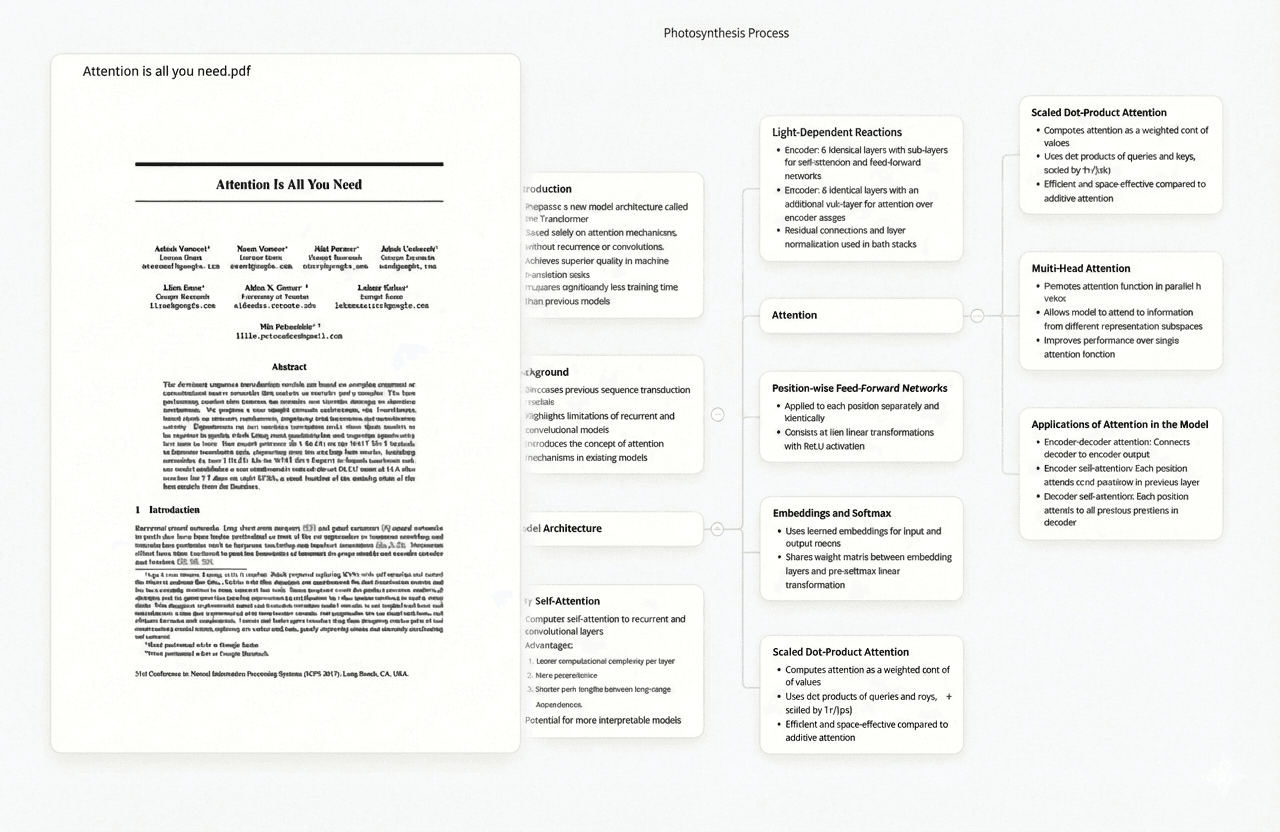
Ponder is a research synthesis platform built around one insight that writing software has never addressed: putting words on a page is not the problem. Knowing which sources say what — and how they relate to each other — is. When you're writing a dissertation chapter or a literature review section, the real bottleneck is not the blank page but the stack of annotated PDFs in a folder you haven't fully read. Ponder closes that gap.
You upload a collection of papers, and Ponder lets you ask questions across all of them simultaneously. Ask what three papers say about a specific concept and Ponder returns a synthesised answer — with page-level citations showing exactly which page in which paper each claim comes from, not just a file name. For researchers writing from evidence, this transforms how a draft takes shape: you stop reconstructing what sources said from memory, and start building arguments from the synthesis Ponder surfaces.
Try Ponder free — no credit card required
Try Ponder for academic research →
- Ask "what does the literature say about X?" across your entire uploaded paper collection
- Get page-level citations with the exact page number for every claim, not just the paper title
- Connect insights from papers you haven't read in months without re-reading them
- Surface contradictions and disagreements between sources before they appear in reviewers' comments
- Use Q&A results as the skeleton of an argument — synthesis becomes an outline
- Compatible with any downstream writing environment: paste Ponder output into Overleaf, Word, or Google Docs
Overleaf — When Your Discipline Demands LaTeX
Overleaf is the standard collaborative LaTeX editor for STEM researchers. If your field submits manuscripts in LaTeX — which covers most of mathematics, physics, computer science, and engineering — Overleaf eliminates the friction of local LaTeX installations, version conflicts, and emailing files back and forth. Its real-time collaborative editing and shared project system make it the default choice for multi-author papers and thesis writing in STEM programs worldwide.
The difference between Overleaf and general writing tools is precision: LaTeX handles equations, figures, cross-references, and bibliography formatting automatically and consistently. Overleaf adds a browser-based interface on top of that, with integrated Zotero and Mendeley syncing, journal submission templates from 3,000+ publishers, and a diff view that works correctly on compiled LaTeX output rather than raw markup.
- Real-time collaborative editing with change tracking and comment threads on compiled PDFs
- 3,000+ journal and conference templates ready to compile without formatting adjustment
- Direct Zotero and Mendeley sync for bibliography management — cite with \cite, format automatically
- Version history recoverable per-commit, not just the last save
- Full LaTeX environment in a browser — no local installation, no version matching between collaborators
- Git integration on the premium plan for groups already using repository-based workflows
Scrivener — When Your Manuscript Is Too Long for a Linear Document
Scrivener is the writing environment built specifically for projects that outgrow a single document. A dissertation has chapters that need to be reorganised, cut, and moved; a book manuscript has scenes that swap sequence mid-draft; a long-form article has sections written out of order and assembled later. Scrivener treats a project as a collection of movable pieces rather than one continuous file, and that structural flexibility is difficult to replicate in any other writing tool.
The practical appeal is the outliner and corkboard view alongside the editor: you see the architecture of what you're building while you write individual sections. For academics writing theses or researchers working on long-form reports, Scrivener's compile feature exports the assembled document into a clean Word file, PDF, or formatted manuscript — so the whole writing process stays in Scrivener and only the final output goes to a reviewer or journal.
- Binder panel keeps chapters, scenes, and supporting documents in one organised project
- Corkboard and outliner views let you rearrange structure without cutting and pasting paragraphs
- Split-editor for writing one section while referencing another, or keeping research notes visible
- Document targets track daily word counts and project completion percentage
- One-click compile exports to Word, PDF, ebook, or final manuscript format with formatting applied at export
- Snapshot feature captures a version of any section before major revisions, independent of system-level file backups
Google Docs — When Collaboration Is the Priority
Google Docs is the choice when you're writing with non-technical collaborators, need access from any device, or want a low-friction entry point that every reviewer already has. The platform's real strength is not the writing environment itself but the collaboration infrastructure: real-time co-authoring, comment threads, suggestion mode, and version history that works without any technical knowledge from co-authors. Supervisors, co-investigators, and editors can review and comment without installing anything.
In 2026, Docs has become meaningfully more capable for research writing through Gemini integration: you can now request literature summaries, draft paragraph outlines, or rephrase sentences without switching applications. This does not replace dedicated research tools like Ponder, but it reduces the gap for researchers doing lighter writing tasks — summaries, emails, grant narrative sections — who do not need a full research synthesis workflow.
- Real-time co-editing with no file sharing — every collaborator always sees the current version
- Comment threads and suggestion mode familiar to non-technical reviewers including supervisors and editors
- Gemini AI integration for in-document summarisation, rewriting, and outline drafting
- Version history labelled by time and collaborator, recoverable by paragraph if needed
- Built-in citation tool for Chicago, MLA, APA, and MLA via the Explore panel
- Free for individuals; Google Workspace for Education is free for enrolled students and university email holders
Microsoft Word with Copilot — When You Need Journal Submission Compatibility
For many academic disciplines — social sciences, humanities, law, and clinical medicine — Word remains the required submission format. Not because it is the best writing tool, but because journal manuscript systems, institutional report templates, and co-authors at established institutions all expect .docx files. Attempting to avoid Word in these fields creates friction that is not worth the ideological satisfaction. Copilot, Microsoft's AI integration added in 2023–24, adds generative drafting, summarisation, and rewriting directly into the document context.
Copilot for Word is most useful for redrafting passages, generating structured outlines given bullet points, and summarising long documents — though its usefulness for research writing specifically is limited by the same constraints as any general-purpose AI: it does not have access to your paper collection or institutional library, and it will not produce citations. For that layer of the workflow, a dedicated synthesis tool like Ponder remains separate. Word handles the final polished output; Ponder handles what that output should say.
- Universal .docx compatibility with every journal submission system, institutional template, and collaborator's machine
- Copilot integration for drafting from bullet points, summarising documents, and rewriting passages in document context
- Comment and track-changes workflow expected by most academic reviewers and journal editors
- Reference manager integration via Zotero, Mendeley, or EndNote plugins for in-text citation and bibliography formatting
- Math equation editor and accessible tables acceptable by journal XML pipelines without manual reformatting
- Available through most university Microsoft 365 Education licences at no cost to enrolled students
iA Writer — When Distraction-Free Drafting Is the Goal
iA Writer builds the minimal writing environment: no panels, no toolbars, nothing on screen except the text you are writing. For researchers who spend time in complex, feature-heavy tools like Overleaf or Scrivener and find that cognitive overhead slows their drafting, iA Writer provides a deliberate friction point in the opposite direction. The interface disappears, and the task is only writing.
Where iA Writer is genuinely useful for academic and research writing is in the early draft phase — when the goal is getting a coherent argument on paper before returning to heavy formatting. Its focus mode highlights the current sentence, and the typewriter mode keeps the cursor centered so the view never jumps. Markdown is the underlying format, meaning output can be pasted anywhere without losing structure. For the writing stages that benefit from uninterrupted drafting — a methodology section, a discussion paragraph, an abstract — iA Writer removes everything between you and the draft.
- Focus mode highlights only the active sentence or paragraph, reducing visual noise during drafting
- Typewriter scrolling keeps the cursor centered so the view follows writing without manual scrolling
- Markdown output can be imported into Ulysses, Scrivener, or converted to Word/PDF at export
- Content blocks let you include and reference separate files without copying content between documents
- Available on Mac, iPad, iPhone, and Windows — syncs via iCloud or custom folder
- One-time purchase (Mac and Windows) or subscription (iOS/iPadOS) — no recurring fee for desktop use
Ulysses — When You Write Everything in One Organised Library
Ulysses treats all your writing as a single, searchable library rather than separate files in scattered folders. Every document, draft, and note lives in one place — filterable by keyword, status, date range, or tag. For researchers who write regularly across multiple projects — grant applications, papers, blog posts, dissertations — Ulysses provides the organisational layer that plain markdown files in a folder lack, while keeping the simplicity of plain text under the hood.
The platform is Mac and iOS only, which limits its utility for Windows users or cross-platform collaborative workflows. But for researchers on Apple devices who want a clean, library-based writing environment with export to Word, PDF, ebook, and Medium — and who prefer writing in Markdown without the friction of managing individual files — Ulysses sits between the minimalism of iA Writer and the complexity of Scrivener, covering a specific niche well.
- All writing in one searchable library — no file management, no lost drafts in different folders
- Writing goals at the document and project level with time estimates based on your writing speed
- Export to PDF, Word, ebook, or HTML with custom stylesheets applied at output
- Markdown input with seamless rendering — write in plain text, preview formatted output
- iCloud sync across Mac, iPad, and iPhone with offline access and automatic conflict resolution
- Direct publish to WordPress, Ghost, and Medium — useful for researchers who also maintain public writing
What These Tools Don't Do That You Might Need Separately
None of the writing tools above solves the pre-writing research synthesis problem. Overleaf handles LaTeX formatting, not understanding what fifty papers say. Scrivener organises your draft structure, not your literature. Google Docs lets collaborators comment, not cross-reference your sources. The common gap across all writing software is the layer between reading your collected papers and knowing what to write: that requires a dedicated synthesis tool like Ponder, not a better word processor.
Separately, none of these tools handles citation management — you will need Zotero, Mendeley, or Paperpile running alongside any of them. And for systematic literature screening (PRISMA-compliant title/abstract screening), the workflow tools are Rayyan, Covidence, or EPPI-Reviewer, which feed into rather than replace a writing environment. The full academic writing stack is typically: Ponder for synthesis → Zotero for citations → one of the writing tools above for the draft itself.
Frequently asked questions
What is the best free academic writing software?
Google Docs is the best free option for most researchers — real-time collaboration, version history, and comment threads at no cost. Overleaf has a free tier that covers single-author LaTeX projects. Scrivener does not have a free tier but offers a 30-day trial. iA Writer and Ulysses have no meaningful free tiers but are one-time purchases (desktop) rather than ongoing subscriptions.
Should I use Overleaf or Word for my thesis?
Use Overleaf if you are in a STEM field, your supervisor uses LaTeX, or your institution has a LaTeX thesis template. Use Word if your department requires .docx submission, your co-authors do not use LaTeX, or your writing involves complex tables and tracked-changes review by non-technical supervisors. Many researchers draft in Word and convert to LaTeX for journal submission.
Where does Ponder fit in an academic writing workflow?
Ponder fits before the writing software, not inside it. You use Ponder to synthesise what your sourced papers say — asking questions across your library, identifying what authors argue, surfacing contradictions, and building the evidence base for your argument. That synthesis output then drives what you write in Overleaf, Scrivener, or Word. Ponder does not replace a writing environment; it replaces the hours spent reconstructing source material from memory before drafting.
See also: Best AI Research Tools for Students | How to Write a Literature Review with AI | Overleaf Alternatives